Short answer: a QR menu system consists of a fixed code, a mobile-friendly web page, and an admin panel where the business owner manages product and price information. The moment a guest scans the code, that page opens instantly in their browser — no app download required.
In this guide, we walk through exactly how a QR menu system works behind the scenes, step by step, from both the guest's side and the business owner's side.
How Does the Process Unfold Step by Step on the Guest's Side?
When a guest sits down at a table, they scan the QR code on it with their phone's camera or a QR scanner app; this is no different from opening a regular link, and it requires no app download. The moment the code is scanned, the menu page opens in the mobile browser.
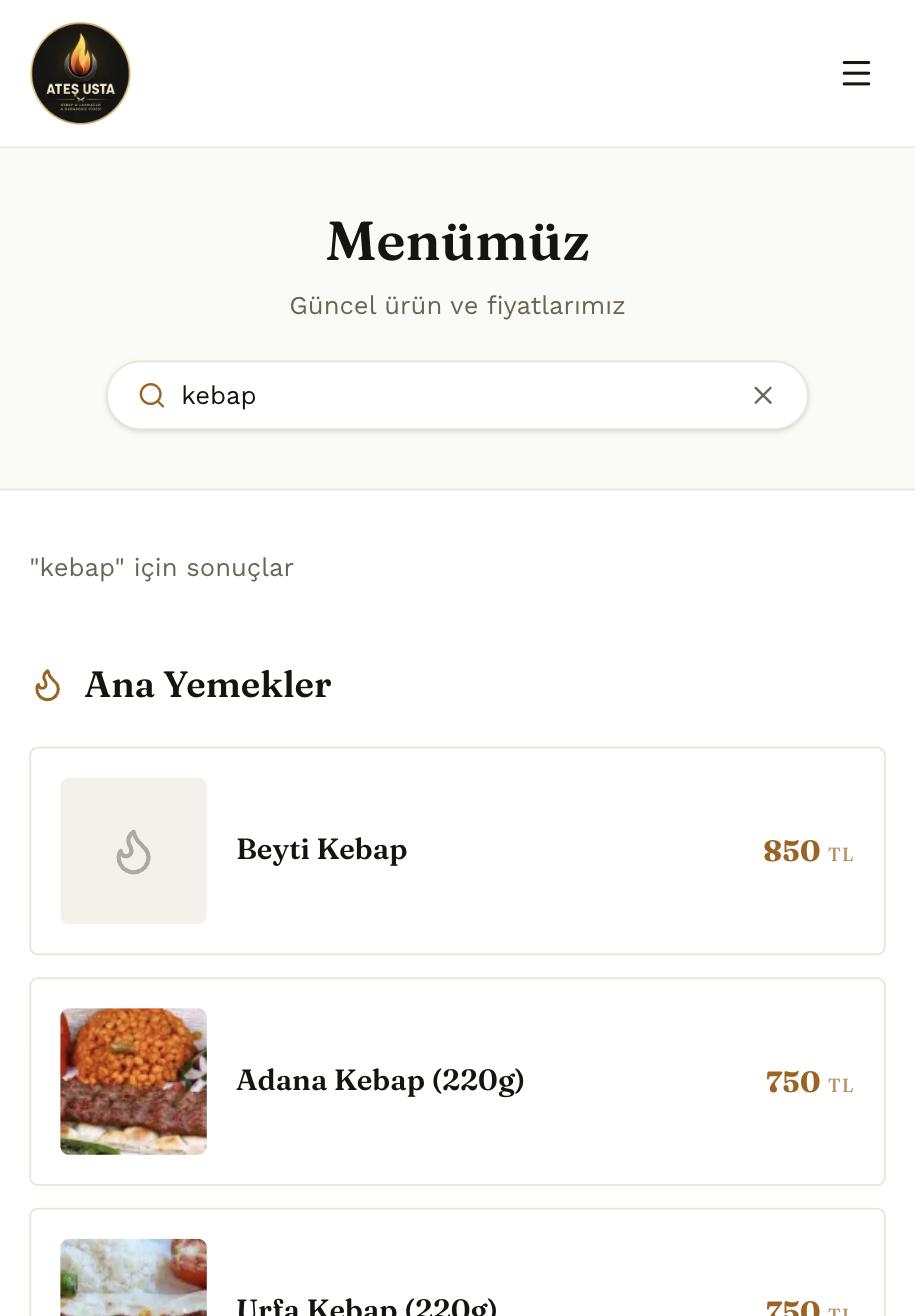
Once the menu opens, the guest can browse between category tabs (starters, mains, desserts) or type directly into the search box to find what they want in seconds. Each item shows its photo, description, and current price on the same screen.
Why Does Not Needing an App Matter So Much?
Every extra step (downloading an app, creating an account) causes some share of guests to give up partway through. A QR menu opening directly in the browser removes that friction entirely — the guest scans the code and is looking at the menu, full stop.
How Does the Process Work on the Business Owner's Side?
The business owner or staff log into their own admin panel to manage every product, category, price, and stock status on the menu. This panel is designed to require no technical knowledge — it's as easy to use as any basic e-commerce admin panel.
When a price changes, a new product is added, or an item temporarily sells out, that change is made and saved in the panel — and it reflects on every table's QR menu instantly, with no separate update or reprint process required.
How Does Product Ordering and Category Management Work?
Which product appears at the top of a category, and which one lower down, is also controlled from the panel; this lets the business strategically position the items it wants to highlight — high-margin products, the daily special, and so on.
A QR menu's real power isn't in the code itself — it's in how fast and easy the admin panel behind it is to use.
Why Vinci Studio?
When we build a QR menu system, our goal is to keep the technical complexity entirely away from the business owner. What sets us apart in our Renaissance-spirited approach to digital production:
- An intuitive admin panel design that requires no technical knowledge
- A fast-loading mobile menu experience with category tabs and live search
- A system built with custom software and automation experience, extendable to future needs
- Infrastructure tested and proven live on real projects (Ateş Usta, Paşam Lounge)
How Is a QR Menu Project Built From Start to Finish?
On the Ateş Usta project, the process started with a full inventory of the categories and products from the existing physical menu. That inventory formed the foundation of the category and product structure in the admin panel.
Next, a photo and short description were prepared for every item; the quality of product photos directly affects how smooth the menu feels to a guest browsing on mobile. Using clear, well-lit product photography at this stage seriously strengthened the menu's overall perception.
Once the panel was delivered, the business's team received a short training session: basic operations like updating prices, adding or removing products, and changing stock status can typically be learned in under fifteen minutes. That's a critical step for the system to actually get adopted in daily use.
How Does the Live Search Feature Technically Work?
The moment a guest starts typing in the search box, product names and descriptions across the menu are scanned instantly, and matching results appear on the same screen — no page reload, no waiting. This is especially useful on larger menus, where it saves the guest from having to open every category one by one just to find a specific item.
In a crowded venue, where verbal communication can be difficult, this feature becomes especially valuable; a guest can search the menu directly instead of asking the server.
What Does This Process Look Like in Practice?
A business owner adding a new seasonal item in the morning and having it available to guests by the lunch service — a level of speed that simply wasn't possible in the printed-menu era.
Technical steps to clarify when setting up a QR menu system:
- Has a product and category inventory been prepared? The panel's base structure is built around this inventory.
- Are product photos ready? Clear, well-lit images directly affect how the menu is perceived.
- Who will be doing the updates, and have they been trained? The panel's daily usability depends on this training.
- Has the physical format for placing QR codes on tables been decided? Options include table stands, menu cards, or table-surface stickers.
Once these steps are clarified, a QR menu project can typically be completed end to end within a few days.
Common Mistakes
The most common technical and operational mistakes businesses make when setting up a QR menu system:
- Filling the menu with low-resolution or outdated product photos
- Building an overly complex category structure that makes browsing harder for guests
- Skipping admin panel training and always relying on the agency for updates
- Placing the QR code somewhere small and easy to miss on the table
- Setting up the menu once and never updating it again — missing the system's real advantage
For businesses with a large menu, getting the category architecture and search feature right matters far more; a small café with only a handful of products can get by with a simple list, but a restaurant with hundreds of items needs a clear category hierarchy.
What Does This Difference Look Like in Practice?
Using subcategories in a large menu (for example, "meat dishes" and "chicken dishes" under "mains") shortens a guest's browsing time and makes the live search feature even more effective.
Who Will Benefit Most From This Guide?
This guide offers a step-by-step reference for restaurant and café owners considering a switch to a QR menu who want to understand how the process technically works.
It's also useful for businesses that already have a QR menu but feel they aren't using the admin panel efficiently — helping them better understand everything the panel offers.
- Restaurant and café owners planning a switch to a QR menu
- Businesses wanting to make more efficient use of an existing QR menu
- Businesses with large menus and a wide range of products
Conclusion: Take Action Now
Would you like to see how a QR menu system would work for your business? At Vinci Studio, we listen to your needs, map out a roadmap tailored to you, and report transparently throughout the process. Get in touch with us or send your request in seconds using the "Get a Quote" button on the homepage.